Remote Monitoring and Management (RMM) software has become essential for efficiently managing and securing devices across distributed networks. With so many RMM options on the market, finding the right one for your business can be challenging. To simplify your search, we’ve rounded up the top RMM tools, evaluating each for critical features like real-time monitoring, automation, compatibility, and usability, to help you make the best choice for your IT needs.
Here is our list of the best RMM Software:



- ManageEngine RMM Central – Best for MSPs needing automated discovery and patching.
- SuperOps – Best for small to mid-size MSPs needing AI-driven RMM/PSA.
- ManageEngine Endpoint Central – Best for enterprises needing unified endpoint security and compliance.
- Pulseway – Best for IT teams needing mobile-first real-time RMM.
The Best RMM Software
Our methodology for selecting the best RMM software:
We’ve broken down our analysis for you based on these key criteria:
- Real-Time Monitoring and Alerting: The software must provide immediate alerts for critical issues, allowing IT teams to respond quickly to prevent downtime.
- Automation and Scripting: A focus on automated task scheduling and custom scripting is essential for streamlining repetitive IT tasks, like patching or maintenance, to enhance productivity.
- Cross-Platform Compatibility: The RMM solution should support a wide range of operating systems (Windows, macOS, Linux) and device types to ensure flexibility for diverse IT environments.
- Integration with PSA and ITSM Tools: Strong integration capabilities with popular ticketing and service management platforms (e.g., ServiceNow, ConnectWise) support seamless workflow management and better service delivery.
- User Interface and Accessibility: An intuitive, user-friendly interface, including mobile accessibility, ensures that IT teams can easily navigate and manage systems effectively, even on the go.
1. NinjaOne – FREE TRIAL
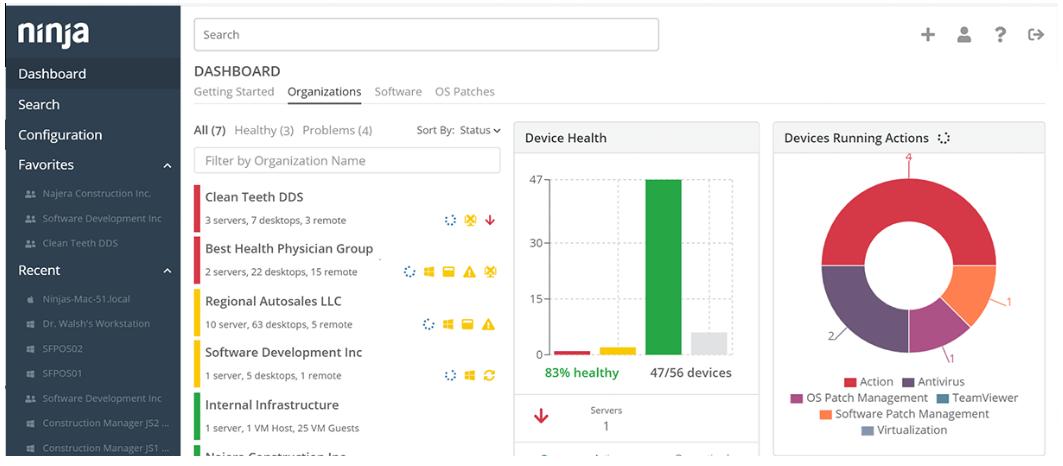
NinjaOne is a complete RMM solution that can monitor and patch your client devices to keep them secure at all times. Its intuitive UI is easy to set up and simple to use, while providing all the insights you need about remote devices. Its proactive alerting and automated remediation also make it highly valuable to organizations.
Key Features
- Real-time Monitoring: Offers real-time monitoring and notifies technicians automatically in case of issues.
- Patching: Automatically patches Windows, Linux, and macOS operating systems, and up to 200 third-party applications.
- Secure Remote Access: Allows direct control over managed endpoints for hands-on support.
- Endpoint Task Automation: Automates repetitive endpoint tasks like device setup and maintenance to free up time for technicians.
- Auto-remdiation: Automatically detects and fixes basic issues like stopped services, missed reboots, etc.
Why do we recommend it?
We recommend this tool because it is one of the most comprehensive RMM software available today. It covers all aspects of remote management, like identifying issues, patching, automatically remediating basic issues, sending notifications, and more. With this tool, users can always be aware of what is going on in remote devices, while keeping their focus on critical issues.
Another notable aspect is its intuitive UI that provides all the information without overwhelming the users. Its self-service portal also comes in handy to track ticket status and escalate them if required.
Who is it recommended for?
NinjaOne is perfectly suited for MSPs who are responsible for handling multiple client environments. It is also a good choice for large enterprises that are geographically distributed and those that have work-from-home policies.
Pros:
- Scalable: This cloud infrastructure can scale well to support an unlimited number of endpoints.
- Native Documentation: All processes, device relationships, and other information about your IT infrastructure are converted into documents for easy reference.
- One-click Actions: Enables you to take quick actions at the click of a mouse.
- Alerting: Sends alerts to the concerned technicians in real-time to help them quickly troubleshoot the problem.
Cons:
- Too many features: NinjaOne’s extensive features can take a while to understand.
Start a 14-day free trial.
EDITOR'S CHOICE
NinjaOne is our top pick for RMM software due to its extensive capabilities that help monitor and troubleshoot remote devices quickly. Its many automated capabilities, like patching and endpoint task management, save a lot of time and effort for technicians, so they can focus on the more critical issues. As a result, the overall efficiency and productivity increase while reducing the chances of downtime. We particularly love its user interface that offers all relevant information through a single pane. Plus, features like native documentation, auto-remediation, mobile management, and scalability make it the top tool on our list.
Download: 14-day FREE Trial
Official Site: https://www.ninjaone.com/freetrialform/
OS: Cloud-based
2. Atera – FREE TRIAL
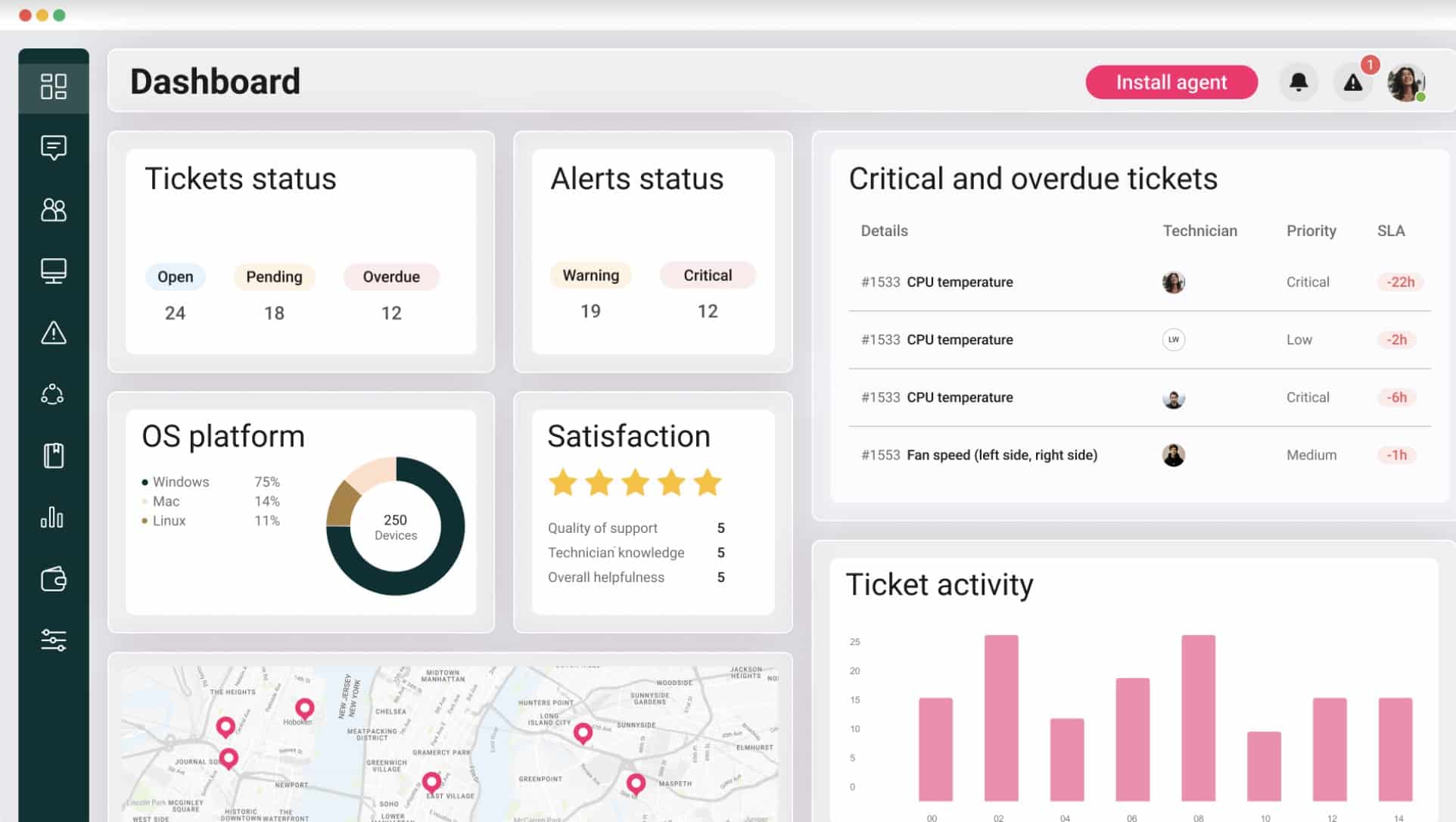
Atera is a robust RMM and PSA tool combining remote monitoring, automation, and helpdesk functionalities into one platform, designed with IT administrators and MSPs in mind. It stands out with its per-technician pricing model, making it highly cost-effective for IT teams managing large volumes of endpoints. Atera also emphasizes ease of use with an intuitive dashboard that integrates real-time monitoring, alerts, and remote access, accessible even through its mobile app. It provides flexible scripting, strong patch management, and integrations with popular software like TeamViewer and QuickBooks, making it adaptable for diverse IT needs.
Key Features:
- Per-Technician Pricing: Unique pricing model that charges by technician rather than endpoint, making it scalable and cost-effective.
- Patch Management: Automates patch scheduling and status tracking for Windows, macOS, and Linux, ensuring device security and compliance.
- Integrated Helpdesk and PSA: Provides a complete helpdesk with ticketing, customer communication, and billing integration, simplifying IT service management.
- Custom Scripting: Includes a library of customizable scripts to automate routine tasks, enhancing efficiency.
- Real-Time Alerts: Sends proactive alerts on critical issues, enabling quick responses to potential problems.
- Remote Access: Offers secure, integrated remote support with tools like Splashtop and TeamViewer for both attended and unattended access.
- Mobile App: Supports on-the-go monitoring, ticket management, and real-time notifications for increased flexibility.
- Security Compliance: Meets ISO and SOC standards, with AES-256 encryption and role-based access for enhanced data security.
- AI-Powered Automation: Features AI-driven ticket tagging and diagnostics to streamline ticket management and issue resolution.
Why do we recommend it?
Atera’s flexible pricing and robust automation make it an excellent choice for MSPs and IT teams looking to streamline their operations without escalating costs. I noted that its intuitive interface and all-in-one platform provide comprehensive remote monitoring, helpdesk, and automation capabilities that cover all major IT management needs.
Who is it recommended for?
Atera is ideal for MSPs, small to medium-sized IT teams, and businesses requiring a cost-effective, all-in-one RMM and PSA solution. Its per-technician pricing is perfect for organizations managing many devices, and its extensive automation and scripting options make it suitable for teams looking to reduce manual work.
Pros:
- Cost-Effective Pricing: Per-technician pricing keeps costs manageable, particularly for teams with numerous devices to monitor.
- Flexible Automation: Automates repetitive tasks, freeing up time for more complex IT functions.
- Comprehensive Integrations: Integrates with popular software, enhancing its usability within established workflows.
- User-Friendly Interface: An intuitive dashboard with customizable widgets allows easy access to essential information.
- Strong Support Resources: Provides extensive resources, including 24/7 support, training videos, and a detailed knowledge base.
Cons:
- Potential Add-On Costs: Advanced features like AI diagnostics may increase costs for some users.
Get Started by registering for a 30-day free trial.
3. Site24x7 – FREE TRIAL
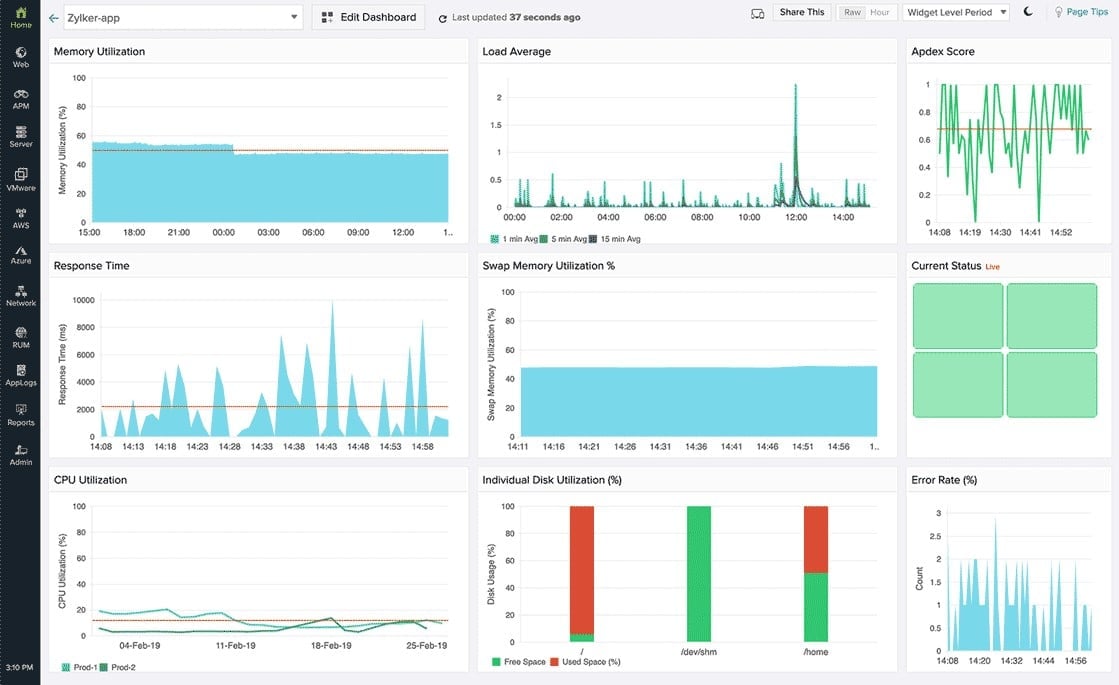
Site24x7 is a comprehensive cloud-based monitoring solution tailored for DevOps and IT operations teams. It supports extensive infrastructure, application, and network monitoring, covering everything from website uptime to cloud services, all visible on an intuitive dashboard. With real-time alerts and end-user experience tracking, Site24x7 provides deep insights into performance and issues, making it easier to ensure optimal availability and efficiency across web and network services. It also offers a range of integrations with IT management tools, enhancing its versatility and adaptability for various environments.
Key Features:
- Full-Stack Monitoring: Provides monitoring for websites, applications, servers, and cloud infrastructure, delivering a complete view of performance.
- Application Performance Monitoring (APM): Monitors app performance metrics like response time and error rates, with support for PHP, Java, .NET, and Ruby.
- Real User Monitoring: Analyzes user interactions in real time, offering insights into experience across different geographies and devices.
- Network Monitoring: Tracks network devices, including routers and firewalls, for performance and uptime, helping to optimize network health.
- Customizable Alerts: Supports multiple alert channels like SMS, email, and integrations with tools like Slack and PagerDuty for real-time notifications.
- Synthetic Monitoring: Simulates user interactions to test application performance, identifying potential bottlenecks before they impact users.
- Cloud Service Monitoring: Monitors cloud platforms like AWS and Azure, providing visibility into resource utilization and service status.
- Integrated Log Management: Centralizes log data from various sources, aiding in troubleshooting and compliance.
- Custom Dashboards: Allows users to create tailored views of essential metrics, streamlining daily monitoring activities.
- Global Monitoring Locations: Offers monitoring from multiple locations worldwide, enabling accurate global performance analysis.
Why do we recommend it?
Site24x7’s all-encompassing monitoring capabilities make it an ideal choice for businesses seeking a unified solution for website, application, and network performance management. I noticed that its broad integration support and extensive alerting options ensure that teams can stay informed and proactive about their systems’ health.
Who is it recommended for?
Site24x7 is well-suited for DevOps, IT, and network operations teams in organizations of all sizes, especially those managing multi-cloud environments and complex applications. Its real user monitoring and synthetic testing features are particularly valuable for teams prioritizing end-user experience and proactive performance management.
Pros:
- Comprehensive Monitoring Tools: Covers a wide range of systems, from websites and applications to network devices and cloud services, making it versatile for diverse IT needs.
- Real-Time Alerts: Provides fast notifications across multiple channels, helping teams quickly address performance issues.
- User-Friendly Interface: Offers an intuitive and customizable dashboard that simplifies the monitoring of complex infrastructures.
- Cost-Effective Solution: Users report significant cost savings compared to other monitoring tools, especially for mid-sized companies.
- Scalable for Various Business Sizes: Flexible enough to suit small businesses to large enterprises, with scalable monitoring plans.
Cons:
- Limited Historical Data Retrieval: Accessing historical data during active failure states can be limited, affecting troubleshooting.
Start a 30-day free trial.
4. ManageEngine RMM Central – FREE TRIAL
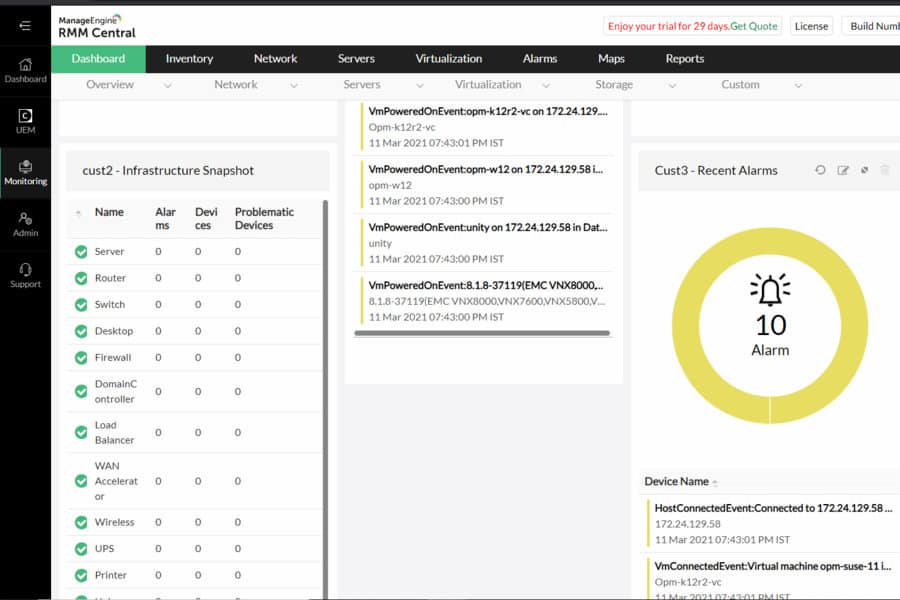
ManageEngine RMM Central is a specialized tool designed for MSPs. It automates many routine IT tasks, like discovering all types of network devices, simplifying applications management, remotely troubleshooting devices, observing critical metrics, deploying missing patches, and more.
Key Features:
- Network discovery: Automatically discovers new devices in your network.
- Device monitoring: Uses protocols like SSH, WMI, and SNMP to monitor the performance of different devices.
- Server management: Manages and monitors physical and virtual servers across multiple operating systems.
- Patch management: Automates patch deployment for Windows, Mac, Linux, and thousands of third-party applications.
- Real-time alerts: Sends real-time alerts via email.
- ML Analytics: Uses machine learning-based analytics that provide insights you need for better management.
- Reporting: Comes with hundreds of out-of-the-box reporting templates for multiple scenarios.
Why do we recommend it?
We recommend this tool because it saves time and effort for MSPs. Its automation features, like auto-discovery, patch management, and data analysis and reporting, can support MSPs in a big way. It also supports multiple protocols to collect data from various devices across multiple operating systems. IT asset management, mobile device management, and remote troubleshooting are other reasons why we recommend this tool.
Who is it for?
It is well-suited for MSPs who must meet stringent SLAs. It can also come in handy for IT administrators who handle remote troubleshooting.
Pros:
- User-friendly interface: Its complex features fit well into an intuitive interface, making it easy to read and understand the status
- Extensive coverage: Supports multiple protocols and operating systems
- Automation: its extensive automation saves time and effort for MSPs and IT admins
- Reporting: Comes with hundreds of out-of-the-box templates
- Flexible licensing: Offers flexible licensing to meet the unique needs of your business
Cons:
- Error messages: Error messages can give a more detailed explanation of what went wrong
Start a 30-day free trial.
5. SuperOps
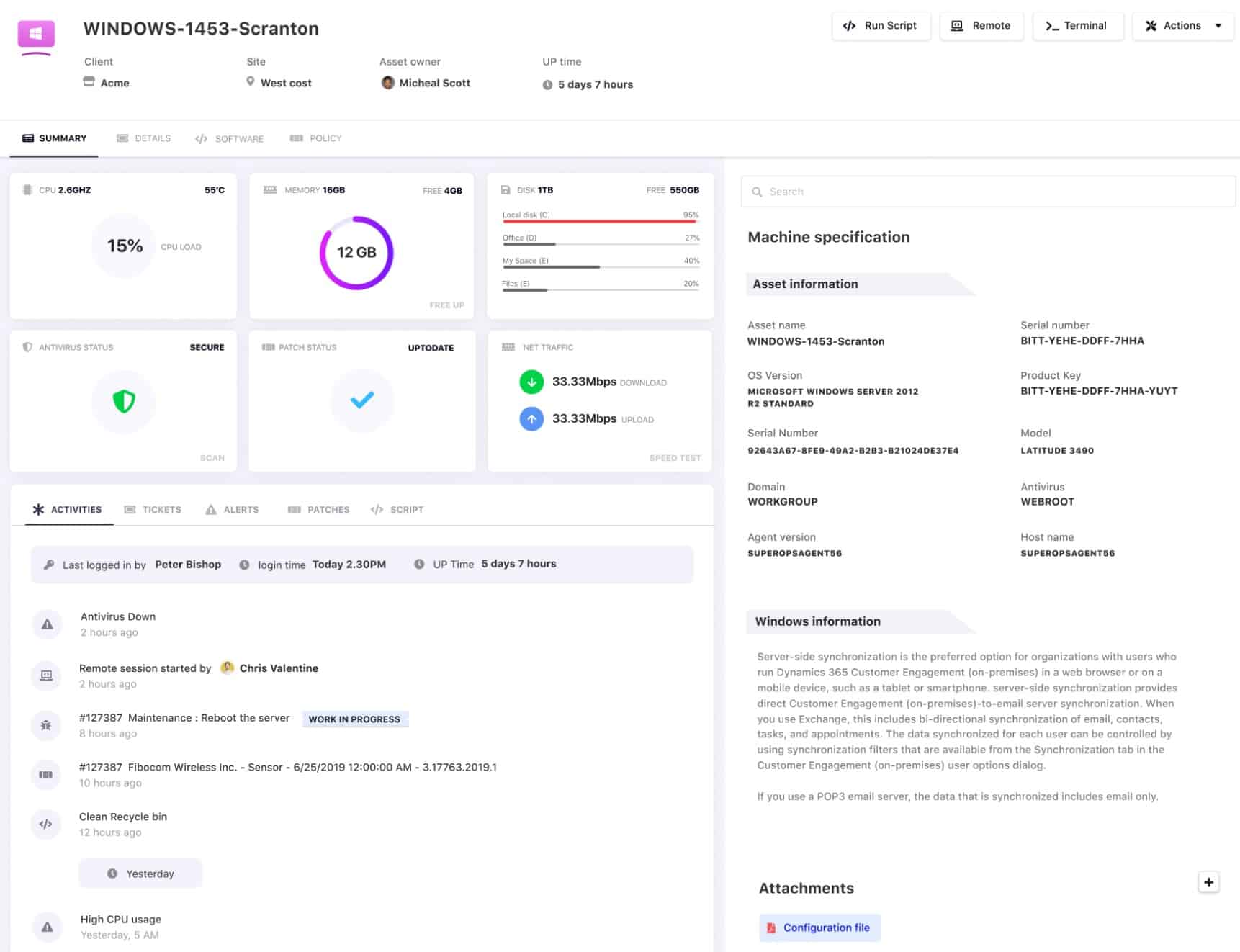
SuperOps is a modern RMM and PSA tool designed to streamline IT management for managed service providers (MSPs). It combines intelligent automation, robust asset management, and an intuitive interface to deliver efficient workflows for both small and medium-sized MSPs. SuperOps stands out for its AI-powered alerting and automation features, which enhance proactive problem resolution. Additionally, its integrated helpdesk and flexible scripting capabilities make it a versatile choice for MSPs aiming to simplify daily operations and improve client service.
Key Features:
- AI-Powered Alerts: Uses AI to identify system anomalies and notify technicians, enhancing proactive issue detection.
- Policy-Based Automation: Allows for hierarchical and group-based policies for tasks such as patch management and alerts, increasing efficiency.
- Asset Management: Provides comprehensive visibility over client assets, aiding in monitoring, tracking, and managing hardware and software.
- Integrated PSA: Combines helpdesk, ticketing, and invoicing tools, streamlining client management from one platform.
- Custom Scripting: Supports customizable PowerShell and VB scripts, allowing automation of complex tasks across managed devices.
- Remote Access Integration: Works with tools like Splashtop and TeamViewer for secure, remote troubleshooting and support.
- Document Management: Offers IT documentation and runbooks, keeping all procedural knowledge and context accessible for support teams.
- Security Controls: Includes AES-256 encryption, two-factor authentication, and IP whitelisting for robust data protection.
- Customizable Interface: Widgets and modules on the dashboard can be adjusted to focus on key metrics, improving usability.
- Project Management: Provides project tracking, milestone setting, and task templates to manage larger client projects effectively.
Why do we recommend it?
SuperOps.ai stands out for its innovative automation and AI-driven alerts, which enhance proactive support and efficiency. I learned that its combined RMM and PSA functionality offers an integrated approach that’s especially beneficial for MSPs seeking to optimize service workflows.
Who is it recommended for?
SuperOps.ai is ideal for MSPs and IT teams in small to mid-sized businesses looking for a cost-effective, all-in-one RMM and PSA solution. Its strong automation capabilities and intuitive design are perfect for teams aiming to enhance service efficiency and streamline operations.
Pros:
- Easy to Use: A user-friendly interface makes SuperOps easy to navigate, even for users new to RMM software.
- Efficient Automation: Automation of routine tasks and AI alerts enhance efficiency, allowing technicians to focus on critical tasks.
- Responsive Customer Support: The support team is noted for their prompt responses and helpful guidance for quick problem resolution.
- Comprehensive Security Compliance: SOC II, HIPAA, and GDPR compliance ensures data security for clients with regulatory requirements.
- Flexible Policy Management: Hierarchical policy settings enable tailored management at client, site, or device levels.
Cons:
- Limited Mobile Access: Currently lacks a dedicated mobile app, which could restrict access for technicians on the go.
6. ManageEngine Endpoint Central
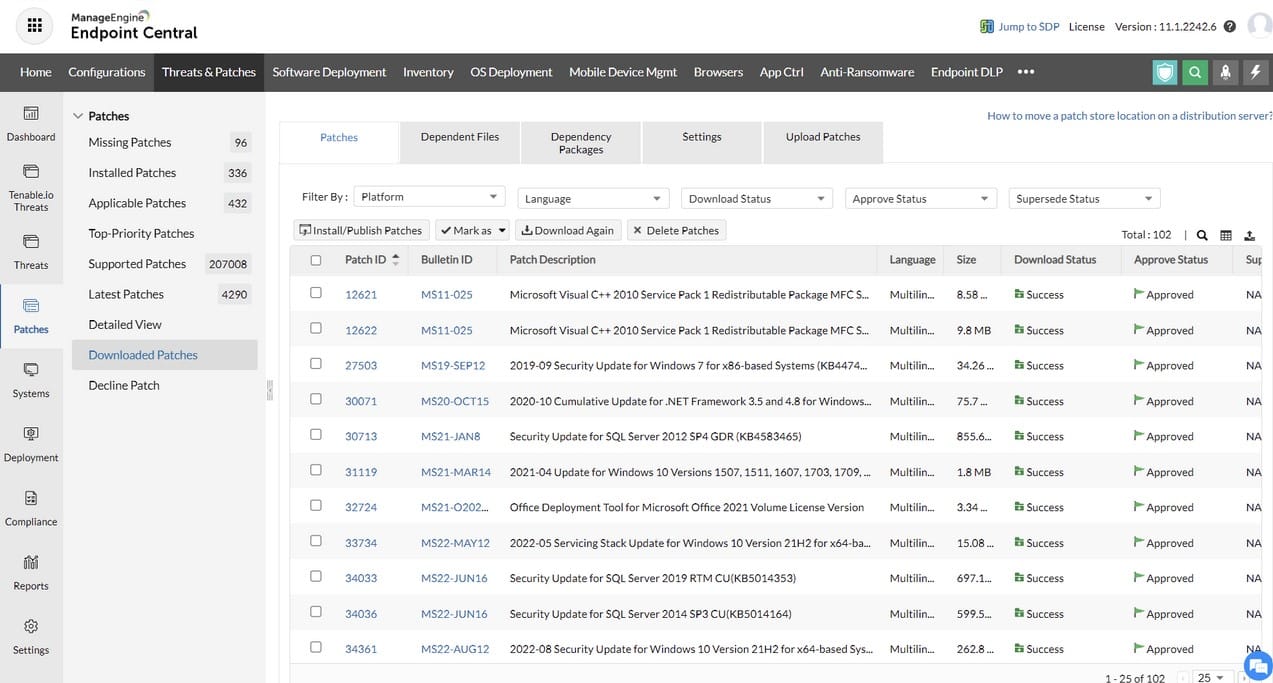
ManageEngine Endpoint Central is a robust unified endpoint management (UEM) solution designed for organizations looking to manage, monitor, and secure various endpoint devices centrally. Known for its extensive capabilities, Endpoint Central provides IT teams with tools for patch management, software deployment, remote control, and security policy enforcement, catering to both desktops and mobile devices. With integrations across popular IT management platforms and an intuitive dashboard, it enables real-time monitoring and rapid troubleshooting. Endpoint Central’s focus on security compliance and flexible licensing options make it suitable for businesses of all sizes.
Key Features:
- Automated Patch Management: Ensures devices are up-to-date by automating patch deployment for OS and third-party applications across Windows, macOS, and Linux.
- Remote Desktop Control: Provides IT admins with access to troubleshoot issues remotely with tools for file transfers, screen sharing, and multi-user sessions.
- Mobile Device Management: Includes device enrollment, app management, and policy enforcement, extending control to mobile environments.
- Role-Based Access Control: Allows administrators to assign user roles and permissions, improving data security and access management.
- Compliance Management: Supports multiple compliance standards, including ISO, CIS, and GDPR, ensuring that endpoint configurations meet regulatory benchmarks.
- Software Deployment: Automates application installations and uninstalls with pre-built templates, enhancing productivity by minimizing manual intervention.
- Asset Tracking and Reporting: Monitors all hardware and software assets, with over 100 customizable reports for in-depth insights into endpoint health and compliance.
- Security Configurations: Enforces security policies like BitLocker encryption, USB control, and browser management to mitigate data risks.
- ServiceDesk Integration: Directly integrates with ServiceDesk Plus, streamlining ticketing, automation, and remote troubleshooting.
- Real-Time Alerts: Sends alerts for system performance issues, compliance gaps, and security incidents, allowing rapid response to potential threats.
Why do we recommend it?
Endpoint Central is highly recommended for its extensive endpoint management capabilities, which cover the essentials of security, patching, and software deployment in one platform. I observed that its emphasis on compliance and seamless integration with popular IT management tools makes it a versatile choice for enterprises managing complex device ecosystems.
Who is it recommended for?
Endpoint Central is ideal for mid to large-sized organizations and IT departments with diverse device environments that require centralized endpoint security, regulatory compliance, and robust asset management. It’s particularly suited for sectors with strict data protection standards, such as finance and healthcare, where endpoint security is paramount.
Pros:
- Comprehensive Endpoint Management: Offers a wide array of tools that cover the full spectrum of endpoint management, from patching to compliance.
- Robust Remote Support: Enables IT teams to remotely troubleshoot with minimal disruption to the end user, improving operational efficiency.
- Scalable for Large Environments: Designed to accommodate a growing number of endpoints, making it suitable for enterprises with complex IT infrastructures.
- Security-Focused Compliance: Supports various regulatory standards and includes robust security configurations, essential for data-sensitive industries.
- Seamless Integrations: Works well with other IT tools, including popular service management and analytics platforms, enhancing its utility in larger ecosystems.
Cons:
- High Licensing Costs: Advanced features in enterprise editions can be costly, potentially limiting access for smaller organizations.
7. Pulseway
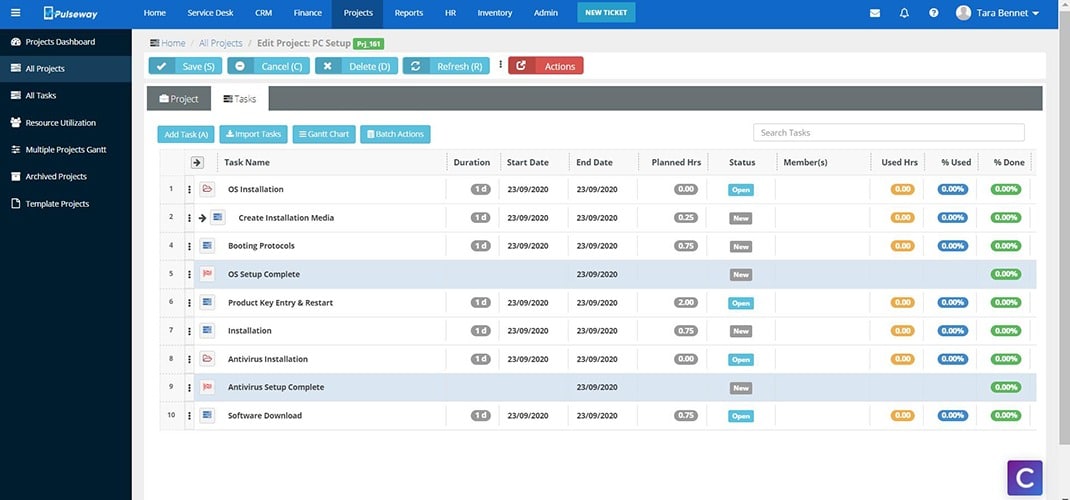
Pulseway is a flexible, mobile-friendly remote monitoring and management (RMM) tool that supports IT teams and managed service providers in monitoring systems and resolving issues in real time. Known for its highly configurable mobile app and responsive alerts, Pulseway allows IT administrators to address problems on the go, from rebooting servers to initiating system scripts. The platform provides a clean and intuitive dashboard, offering visibility across all managed devices, and integrates well with tools like PSA systems, enabling seamless IT operations. Pulseway is particularly well-suited for SMBs and MSPs that need a scalable, easy-to-use RMM.
Key Features:
- Mobile-Friendly Monitoring: Enables IT admins to monitor and resolve issues via mobile, offering full functionality comparable to the desktop version.
- Real-Time Alerts: Sends immediate notifications for system issues, such as CPU overload or downtime, enabling prompt responses.
- Multi-Platform Support: Monitors various environments, including Windows, Linux, and macOS, as well as applications like Active Directory and VMware.
- White Labeling: Allows MSPs to brand the interface and reports with their own branding, enhancing client-facing presentations.
Why do we recommend it?
Pulseway stands out as a mobile-first RMM tool with powerful automation and real-time alerting, making it ideal for IT teams that need flexibility and responsiveness. I found that its cost-effectiveness and integration options also make it a practical choice for SMBs and MSPs seeking comprehensive, scalable IT management.
Who is it recommended for?
Pulseway is best suited for MSPs, SMBs, and IT departments that prioritize mobility and real-time monitoring. Its easy setup and customizable alerts make it an excellent choice for teams needing quick deployment and efficient remote management, especially those with on-the-go technicians.
Pros:
- Efficient Mobile Management: The mobile app provides robust management features, allowing IT teams to stay responsive on the go.
- Rapid Setup and Integration: Easy deployment process with strong PSA integrations, streamlining operations for MSPs.
- Affordable for SMBs: Cost-effective pricing makes Pulseway accessible for small to medium businesses with tight budgets.
Cons:
- Limited Linux Support: Lacks certain management features for Linux systems, limiting its functionality in mixed OS environments.
- Inconsistent Update Schedule: Users report wanting more predictable updates to better plan for feature rollouts.