 Every administrator knows that having a reliable network map is essential for everything from troubleshooting to design and planning.
But what if you’ve inherited a network with no documentation?
What if you simply ran out of time to create your own network diagrams?
SolarWinds Network Topology Mapper (NTM) offers a decent solution, with the ability to automatically map your network. Not only that, but it adds in some useful reporting features too – including the ability to create hardware inventory and switch port usage reports. What Does it Do?
What Does it Do?
NTM boasts an impressive array of features including:
- Scans your network and auto-generates network maps
- Can exports maps to MS Visio, SolarWinds Network Atlas, and PDF format
- Scheduled scans of the network to detect changes
- Detailed inventory reports
How Well Does it Work?
I installed NTM in the lab and scanned my test network.
The discovery process utilizes several polling mechanisms including SNMP, WMI, CDP, LLDP, and VMware enabling NTM to find every device on a network along with important information like device type and hostname.

Mapping
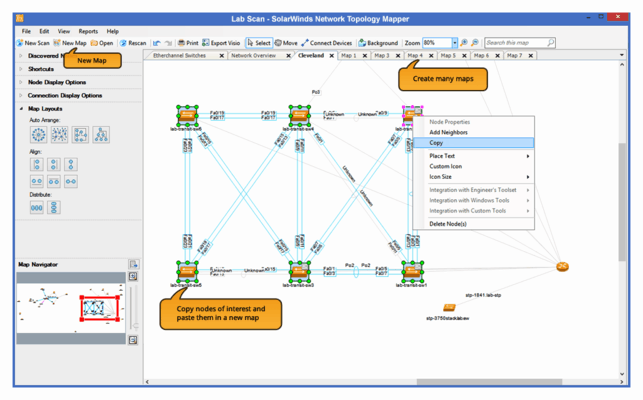
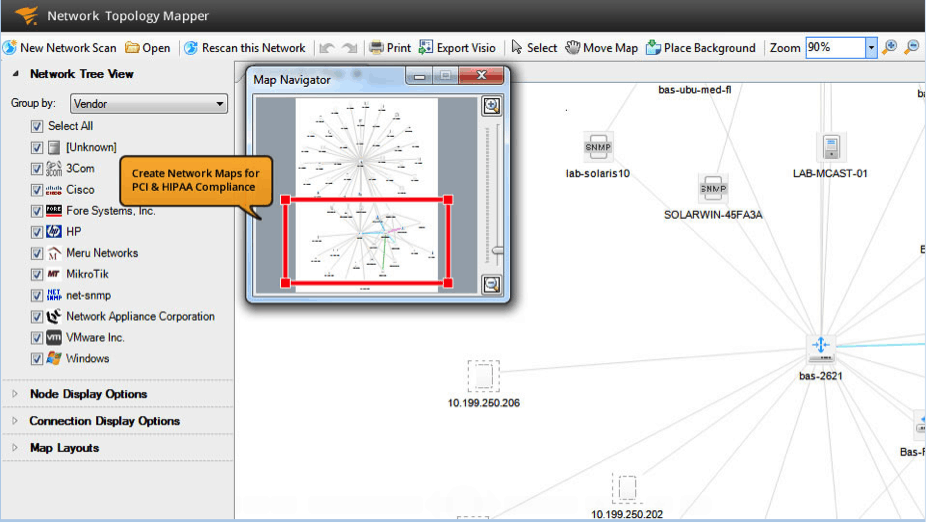
In short order, NTM scanned my test network and drew a map showing all the networked devices in the Lab. Some minor manipulation is required to tidy up the map and move devices around, but in general the map is readable and this step may not be required. NTM includes 4 map layouts so you can choose the one that one that helps you visualize your network in a way that makes sense. The left toolbar shows a menu of filters to apply to your map. For example, you can view specific device types, network segments, or the entire network. NTM also shows connection speeds between nodes that could be helpful in identifying bottlenecks.
NTM includes the ability to zoom to different levels of your network maps on the fly via the map navigator. Maps can include extreme detail for every workstation, or only Layer 3 devices like routers and their connected networks. This is great for documenting the logical layout of larger networks. From there, you can export network diagrams to MS Visio with just a couple of clicks.
Reporting
Have you ever had to deal with a virus or worm on the network? If so you might have tried to find a problem machine by looking up the MAC address and identifying which switch port it’s plugged into. The switch port usage report is a big help here, instantly generating a list of ports with MAC and IP addresses.
Scheduled Scanning
NTM can be configured to scan on a set timetable. This is a great feature to help identify changes on the network. From one scan to the next NTM will mark the addition of new workstations or other networked gear.
Drawbacks
NTM performs admirably, but I have a couple of gripes. Most maps will require some minor tweaks to position objects where you want them. Unfortunately, re-scanning the network also re-draws the map and removes your customizations. It would be nice if the software was smart enough to keep your changes when adding devices.
The initial scan can be very slow on large networks. SolarWinds has several recommendations for helping scanning performance that can be found here. In general, they recommend scanning network segments rather than an entire network.
Conclusions and Pricing
NTM includes features that are comparable with more expensive solutions/packages for a fraction of the price. NTM can be purchased for $1495(USD).
To sum it up, SolarWinds Network Topology Mapper is a tool that can do multiple jobs. It is part mapper, part device discovery, and part network reporting. It’s well worth the free trial download if for no other reason than to see what really is plugged in to your network.
Rating: 

SolarWinds Network Topology Mapper FAQs
How does SolarWinds Network Topology Mapper handle network changes and updates?
SolarWinds Network Topology Mapper handles network changes and updates by using automatic discovery and mapping techniques, allowing it to detect and reflect changes in network devices and connections in real time.
What are some alternatives to SolarWinds Network Topology Mapper?
Alternatives to SolarWinds Network Topology Mapper include other network mapping tools such as NetBrain, Paessler PRTG Network Monitor, and Open-AudIT.
What are some features of SolarWinds Network Topology Mapper?
Features of SolarWinds Network Topology Mapper include automatic discovery and mapping of network devices, customizable map layouts and styles, real-time network traffic visualization, and integration with other SolarWinds software tools.
How does SolarWinds Network Topology Mapper help with network management?
SolarWinds Network Topology Mapper helps with network management by providing network administrators with a visual representation of their network topology, allowing them to quickly identify and diagnose issues, optimize performance, and plan for future network expansion.
How does SolarWinds Network Topology Mapper compare to other network mapping tools?
Compared to other network mapping tools, SolarWinds Network Topology Mapper is known for its ease of use, flexibility, and scalability, as well as its integration with other SolarWinds software tools.
How does SolarWinds Network Topology Mapper handle different types of network devices and connections?
SolarWinds Network Topology Mapper handles different types of network devices and connections by using a variety of discovery and mapping techniques, including SNMP, CDP, LLDP, and ARP.