SQL Servers are the backbone for many databases for both small and enterprises level companies. Unfortunately, this makes SQL Servers a prime target for cybercriminals.
In this article, we’ll cover some basic steps you can take to secure your SQL environment, as well as touch on a few tools you can use to easily manage and audit your SQL Server.
Here is our list of the best SQL Server security monitoring tools:
- ManageEngine EventLog Analyzer – EDITOR’S CHOICE A comprehensive SQL Server auditing tool that spots anomalies and issues for quick remediation. It helps keep databases secure and compliant. Start a 30-day free trial.
- Database Performance Analyzer This SolarWinds package is a rival to SQL Sentry and it provides compatibility with a longer list of DBMSs. Runs on Windows Server.
SQL Server Security Basics
Poorly secured database servers are frequently to blame for data breaches. Organizations require Microsoft SQL Server, but it’s also tough to learn and set up. Here are some important SQL Server security basics you should be aware of to secure your server’s data.
SQL Server Authentication vs. Windows Authentication
Windows Authentication, where users must first authenticate themselves before connecting to SQL Server, uses Active Directory (AD) for authentication. It is the recommended authentication mode because AD is the most effective approach to manage password restrictions and user and group access to apps in Windows environments.
The database server is the backend for SQL Server Authentication. It may be used in cases where Active Directory is unavailable.
Windows Authentication can be utilized with SQL Server (mixed mode). It’s preferable to use Windows Authentication whenever feasible.
Because hackers frequently target this account, you should regularly change or update the same account’s password if you need to utilize SQL Server Authentication. The ALTER LOGIN Transact-SQL (T-SQL) command or the SQL Server Management Studio service can be used to manage SQL Server accounts, such as an (if enabled).
Roles and Logins for the Server
User logins and server logins are the two types of SQL login you may create, regardless of the authentication approach you use. In the section that follows, we’ll discuss user logins.
Users may log into a SQL Server installation using their actual login credentials. Each server account is assigned a set of server roles to perform certain activities on the instance. The public server role, which provides limited access to the instance, is assigned to all server logins by default. DB creator and server administrator are two additional roles that may be assigned.
You may also create server logins using the SQL Server Management Studio or T-SQL. To set up a default database, you must first identify a database to be used as a default. Each server login has its default database entry.
The user login and the server login don’t have to be identical. Unless the role given to the login gives access to all databases, the server login will be denied access to the default database. You may map a server login to a specific database user if you choose when creating them.
Users, Schema, and Roles in the Database
When you create a new user login, the following information must be specified: The database, username, and default schema. If no other schema is provided, all objects created by the user will use the default schema.
The schema name is not required in T-SQL instructions since database schemas are semantically distinct from other database objects.
When you create user-defined objects, the Microsoft schema is used by default. The sys schema is a default one that contains system items.
User logins are assigned databases in the same way that server roles are. The database roles on the server include public, DB access admin, DB owner, and DB security admin.
Permissions and Securable
You can set one or more securables instead of server or database roles when you don’t want to grant a user too much or too little access. Securable is SQL Server resources that may be accessed by server and user logins at the server, schema, and database levels.
Securable lets you grant server login access to a table or function without granting that login access to the connection.
Only users with the permissions can access SQL Server. Allowing or preventing certain people from accessing or altering data is accomplished by using permissions. GRANT, DENY, and REVOKE are T-SQL statements that may be utilized to establish permissions.
The greatest problem with permissions is that they can be inconvenient to manage. When a securable is given DENY privileges, the Permissions property does not pass down to lower-level objects. Denial at the object level can’t withstand column-level GRANT, so the column’s grant of access overrides the denial of a table.
Because they might be difficult to comprehend, double-checking permissions using T-SQL is always a smart idea. The table ’employees’ is a good example of the object JoeB has access to.
Encryption of Data
SQL Server has several encrypting options. Like internet traffic between a browser and the server it connects to, SSL protects data as it travels between the server and client application. It’s also feasible for a user to authenticate the server’s identity using its certificate.
TDE encrypts data that is saved on a computer’s hard drive. It encrypts all of the data and logs files, in particular. Enabling TDE does not require any modifications to the client applications.
Backup Encryption, like TDE, encrypts SQL backups rather than the currently active data and log files.
This kind of data encryption ensures that the database’s information is protected from unauthorized access by encrypting each column and cell separately. The decryption of encrypted data is handled via a procedure requiring updating client software.
No client app changes are needed to enable Always Encrypted; data is encrypted over the network, in memory, and on disc. It also protects sensitive information from SQL Server administrators’ curiosity. Because SQL Server isn’t able to access the encrypted data, various indexing and functions won’t operate.
Row-level Security
Businesses may use Row-Level Security (RLS) to limit who can access which database rows include critical data. For example, allow users to view only the rows that contain information about their clients.
RLS has three main components:
- Predicate function
- Security predicate
- Security policy
The predicate function determines whether a record may be accessed by the user running the database query. For example, the user’s username executing the query might be compared to a field in one of the row’s columns.
You may either silently filter data without raising alerts or block with an exception if you are denied access to rows as part of a function. Security policies also protect functions that are table-bound.
Constant Monitoring
Even if you do everything correctly, your SQL Server may still be attacked. Last but not least, install software for continuous monitoring to aid in the detection and repair of issues as soon as possible.
Anti-injection Safeguards
Use security tools to scan event logs and computer systems for SQL injections in your database programs. When developing safeguards against SQL injection, consider employing stored procedures.
The procedure rejects a harmful SQL query and provides no useful information to the attacker because it only accepts specific sorts of code and requires particular arguments.
Updates Regularly
One mistake is to forget about your SQL Server tools and applications as an update. You’ll be left out on the latest security upgrades if you don’t keep your SQL Server tools and applications up to date.
Maintain a regular patching schedule so that you don’t have to shut down production until the fix or upgrade has had enough time in a development environment.
Secure Backups
Because a data center outage has the potential to impact both your backups and operational databases, you must use the same security measures. As a result, you should follow the same processes when it comes to your backups, such as restricting access and utilizing security precautions.
Controlling who has access to your backups is critical, but ensuring that the data storage where your backups are kept is safe—as a result, finding a program that can protect SQL backups.
Several cloud-based backup services provide a centralized, easy-to-use dashboard and cloud-based storage that is both secure and fast. This program may safely store and reapply data on servers, workstations, and documents.
It’s also possible to use SyncBackSE as a data-protection system for servers. It may manage backups and recovery for hundreds or thousands of client locations, ensuring that server data remains safely and securely stored.
Fortunately, there are some resources available to assist you. N-able Cove Data Protection protects your SQL Server data by saving it in the cloud. Furthermore, you will be able to restore your device quickly.
N-able Cove Data Protection is an excellent choice for MSPs since it increases security while also making backups more simple.
Simplicity of SQL Servers
Every component of your business should be as simple as possible. There’s no point in adding extra functions or applications unless they’re genuinely beneficial to your workflow.
You can drastically reduce the likelihood of your server being hacked by eliminating unneeded software or functions. Instead of utilizing the real production environment during development, testing, and testing new features, utilize a creation or test environment.
Make sure to turn off the SQL Server Browser when running a typical SQL Server instance. When left enabled, the Server Browser allows IT staff and authorized users to discover database instances on the network. Still, it also gives attackers access to your SQL Server resources if they are not deleted correctly.
The Best Security Monitoring Tools for Microsoft SQL Server
Many tools are now available to help businesses maintain the security and efficiency of their databases. The foremost priority is to use SQL database security solutions since data risk is high if the database isn’t secure.
Our methodology for selecting SQL security monitoring tools and software
We reviewed various SQL security monitoring tools and analyzed the options based on the following criteria:
- An autodiscovery system to log all network devices
- A network topology mapper
- The ability to collect live network devices statuses by using SNMP
- A facility to analyze network performance over time
- Graphical interpretation of data, such as charts and graphs
- A free trial period, a demo, or a money-back guarantee for no-risk assessment
- A good price that reflects value for money when compared to the functions offered
Importance of SQL Server Security
The Microsoft SQL Server database platform is a well-known and rapidly developing business database system.
SQL Servers are full of crucial and sensitive data, increasingly targeted by cybercriminals. You’re leaving your data vulnerable to data breaches and theft if you don’t have secure access to your SQL Servers.
One of the most difficult yet crucial tasks you’ll have to take is keeping an eye on SQL Server security.
You can prevent fraudulent entries from affecting your SQL Servers by keeping them isolated, enforcing strict access controls, restricting functions, and placing security and monitoring systems at the core of your operation.
1. ManageEngine EventLog Analyzer – FREE TRIAL

ManageEngine EventLog Analyzer is an advanced tool for managing the security of your SQL servers. It gathers data from different sources and analyzes them to identify any complex attack patterns, SQL injection attempts, credential abuse, and other actions or vulnerabilities that can undermine the security of your databases. It will instantly send alerts, so you can fix the problem right away.
Key Features:
- Monitoring DDL and DML activities.
- Identifying and mitigating data exfiltration attempts.
- Out-of-the-box reporting templates.
- Detection of SQL injection attempts.
- Auditing login activities.
Why do we recommend it?
We recommend this tool for its comprehensive approach to database security. It continuously gathers and analyzes logs to spot issues and potential security vulnerabilities. It even sends real-time alerts and displays the contextual information on dashboards to make troubleshooting quick and easy. Its detailed reports also help with auditing and compliance.
Who is it recommended for?
It is highly recommended for database engineers, architects, network engineers, and MSPs who are responsible for maintaining the security of SQL servers.
Pros:
- Detects a wide range of SQL server-related attacks.
- Checks for privilege abuse to prevent data exfiltration.
- Comes with integrated incident response management.
- Simplifies compliance with its out-of-the-box reporting templates.
Cons:
- Not suited for non-technical users.
Start a 30-day free trial.
EDITOR'S CHOICE
ManageEngine EventLog Analyzer is our editor’s pick for the best SQL server security tool because it covers a wide range of attacks that can impact your SQL server’s security. It handles something mundane and often overlooked like credential abuse to advanced attacks like SQL injection. It even monitors functional and structural-level changes in your databases by tracking the changes. All this data is presented on intuitive dashboards for easy understanding of the issues and their troubleshooting. We also love its well-generated reports that meet the compliance requirements of leading standards, while also meeting your internal auditing policies. Due to all these features, we highly recommend this tool to safeguard your SQL server.
Download: Start a 30-day FREE trial
Official Site: https://www.manageengine.com/products/eventlog/sem/glp/sql-server-auditing-tool.html
OS: Windows
2. Database Performance Analyzer – FREE TRIAL
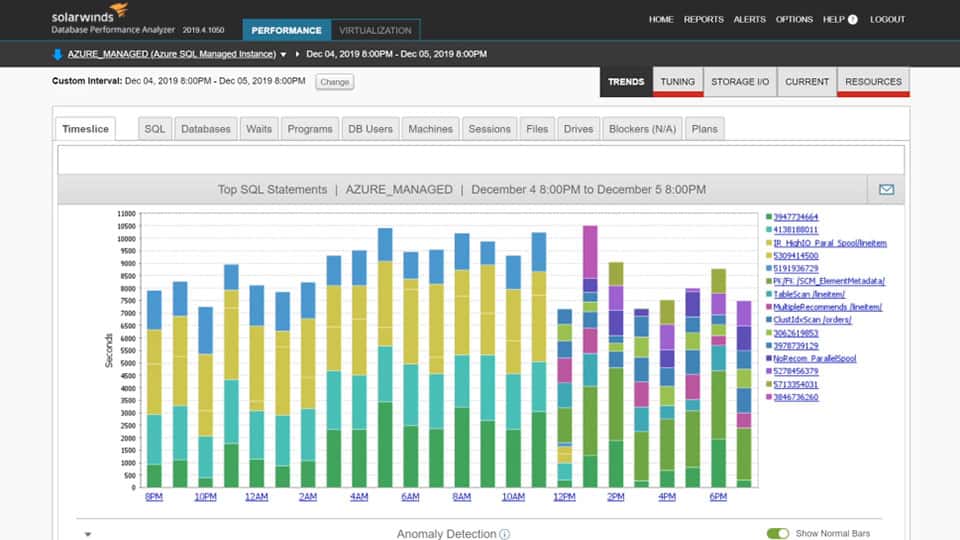
SolarWinds offers a Database Performance Analyzer (DPA) tool that constantly monitors your database and performance to verify that everything is functioning properly. The feature explains why a call is rejected and past statistics and performance predictions based on prior usage.
Key Features:
- Database object analysis
- Query optimization
- Anomaly detection
Why do we recommend it?
Database Performance Analyzer is able to monitor many different DBMSs, which includes SQL Server. This is a performance monitor that examines running queries and looks for reasons why some of them are slow or hang. The package also performs anomaly detection that identifies unusual behavior. This is useful for security monitoring because those anomalies could represent attacks on the database.
Who is it recommended for?
Users of SQL Server have the option of the SQL Sentry package but DBAs of other DBMSs would need to try this package instead. The system can monitor Oracle, MySQL, MariaDB, PostgreSQL, DB2, Amazon Aurora, and SAP ASE. It will also monitor Azure SQL and SQL Server. This is an on-premises package for Windows Server.
Pros:
- Highly intuitive DB management system tailored for medium to large-size database implementations
- Monitors in real-time, offering a number of alert and notification options that can integrate into popular helpdesk solutions
- Threshold monitoring helps keep teams proactive, and fix issues before they impact performance
- Dashboards are highly customizable and can be tailored to individuals or teams
- Built-in query analysis helps DBAs build more efficient queries
- Leverages machine learning to identify performance bottlenecks
Cons:
- Could use a longer trial period
DPA’s computer vision and machine learning technology can identify anything that appears to be a data processing irregularity or a red flag pointing to a security concern. A 14-day free trial is available.
Download: Click here to download and start using this tool.
SQL Server Security Tools FAQs
What are some common SQL security threats?
Common SQL security threats include SQL injection attacks, brute force attacks, denial of service attacks, and unauthorized access attempts.
What are some common SQL security vulnerabilities?
Common SQL security vulnerabilities include weak passwords, unpatched software, misconfigured databases, and insufficient access controls.
What are some common SQL security best practices?
Common SQL security best practices include regularly patching software, using strong passwords and access controls, encrypting sensitive data, and auditing and monitoring database activity.
