A good TFTP server should be part of every admin’s toolkit.
We’ve rounded up some of the Best Free TFTP server applications we could find and compared them all below.
But first some basics:
What is TFTP?
TFTP, or Trivial File Transfer Protocol, is a simple and basic file transfer protocol. It’s particularly useful for transferring small files and is characterized by its non-extensible design.
Technical Features of TFTP
TFTP operates using UDP (User Datagram Protocol), making it a connection-less protocol with no error checking—hence its descriptor, “trivial.” It is most effective when used over a Local Area Network (LAN), rather than a Wide Area Network (WAN) or the Internet.
Applications in Network Administration
For network administrators, TFTP serves as a vital tool for specific tasks such as backing up router and switch configuration files, or distributing operating system upgrade files. It is also commonly used for serving PXE boot files for network-based workstation setup or thin-client installations.
Variety of TFTP Servers
There is a wide array of TFTP server options available, each with their own set of features. Some offer just the basic functionalities, while others come with advanced features like security enhancements.
Selecting a TFTP Server
Choosing the right TFTP server is essential for every network administrator’s toolkit. Many free TFTP server applications are available, each with their own advantages and disadvantages.
TFTP Basics
What is TFTP?
TFTP, or Trivial File Transfer Protocol, is a simplified file transfer protocol designed for transferring small files. Notably, it lacks security authentication features.
Technical Specifications
The protocol operates over UDP (User Datagram Protocol), which doesn’t include error checking functionalities present in TCP (Transmission Control Protocol). Consequently, it is best utilized for transferring small files within Local Area Networks (LANs) as opposed to larger networks or the Internet.
Applications in Network Management
For network administrators, TFTP is invaluable for specific tasks such as backing up configuration files for routers and switches. It’s also commonly used for distributing PXE boot files for thin-client systems or network-based workstation installations.
Variety in TFTP Server Options
There is a plethora of TFTP servers available on the market, each with different features. Some are very basic, while others incorporate advanced features, including security measures.
The best Syslog Servers:
Our methodology for selecting TFTP servers for Windows
We reviewed various TFTP servers and analyzed the options based on the following criteria:
- Support for Windows environment
- Ease of use and deployment
- Ability to support access controls and granular file transfer options
- A facility to analyze network performance over time
- Graphical interpretation of data, such as charts and graphs
- A free trial period, a demo, or a money-back guarantee for no-risk assessment
- A good price that reflects value for money when compared to the functions offered
1. TFTPD32 from Philippe Jounin
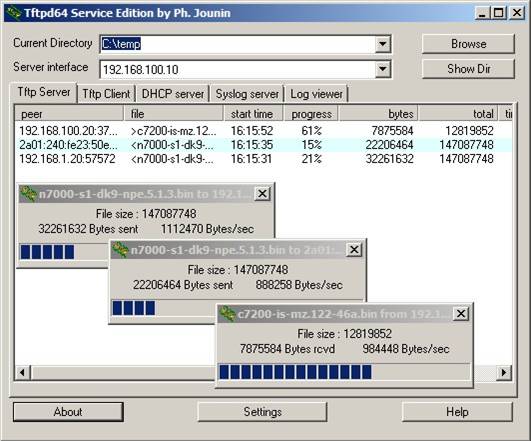
TFTPD32 has become the go-to TFTP server for many admins ever since Cisco and 3Com stopped providing TFTP software years ago.
Why do we recommend it?
TFTPD32 operates on 32-bit computers and there is version for the 64-bit architecture, called TFTPD64. This is a simple little tool for Windows that provides a TFTP server, a TFTP client, a DHCP server, and a log viewer with an option for Sylog viewing. This is a fairly old utility but TFTP itself is very old and there hasn’t been any need to update the tool.
TFTPD32 is free open source and includes a number of useful additional server features like Syslog, SNTP, DHCP, and DNS. And don’t let the name fool you – there’s a 64-bit version available for newer O/Ses too, called TFTPD64.
The TFTP server component is multithreaded to support multiple uploads at once, and has some security features, as well as interface filtering.
Who is it recommended for?
This free tool is handy to have just in case. It is likely to appeal to the managers of small networks who have no budget for system management tools and just don’t need the complexity of a full network configuration management suite.
Pros:
- Open-source tool, completely transparent
- Has a simple interface that gets the job done and is easy to navigate
- Offers a host of configurable options
- Can track file transfers via log, or visually in real-time as they come in
Cons:
- More complicated option has options for DNS, DHCP, and timeclock servers
- Has a higher learning curve than other options
2. SolarWinds TFTP Server
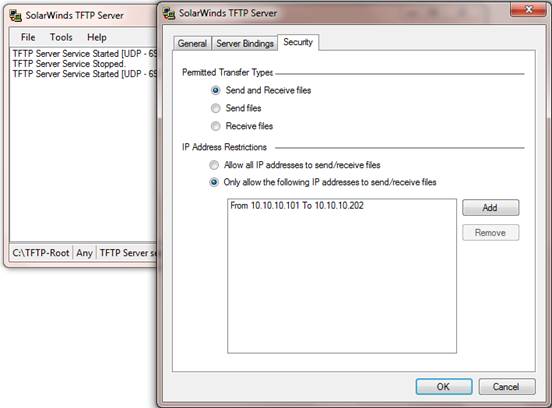
SolarWinds offers a range of free tools that complement their Orion suite of network management products, which we’ve recently reviewed. Their Free TFTP Server has been very popular with admins thanks to its flexibility and ease of use.
Why do we recommend it?
SolarWinds TFTP Server is a good choice for network managers who want to transfer network device configuration images to a central library. The tool has specific routines built into it for such a task and it also has security features that are not usually encountered in TFTP systems.
The server can run as a Windows service and includes the ability to transfer large 4 GB files. It also runs as a multi-threaded program, allowing uploads from multiple network devices simultaneously.
On the security side of things, you can authorize specific IP addresses or ranges of IP addresses for transfers – helping to place some control around what is otherwise an unsecured service.
Who is it recommended for?
This is a useful tool for network managers to use within the network. TFTP shouldn’t be used in any environment that isn’t already secured, such as for internet transfers. The tool is free and so is worth downloading just to have on hand. Buyers of a network configuration manager will probably get a TFTP server built into that system and so wouldn’t need this tool.
Pros:
- Completely free
- Simple interface, no clutter, fluff, or advertisements
- Available as a Windows service, allowing tasks to be scheduled
- Can authorize single IP addresses, or an entire range
- Lightweight install uses minimal resources
Cons:
- Like all TFTP servers, you will still need technical experience to set the service up properly
In Summary
All of these tools should provide the basic functionality that most admins need in a TFTP server – they just go about it in different ways. Install your TFTP server today, and rest easy knowing that you have a way to back-up critical configuration files.
Free TFTP Servers FAQs
How does a TFTP server work?
A TFTP server works by listening on a specified port for incoming TFTP requests. When a client sends a request to the server, the server responds by either sending or receiving a file.
What are the benefits of using a TFTP server for Windows?
The benefits of using a TFTP server for Windows include the ability to transfer files quickly and easily over a network, the ability to automate file transfers, and the ability to easily manage large numbers of files.
What types of files can be transferred using a TFTP server?
A TFTP server can transfer any type of file, including firmware updates, configuration files, and software packages.
Can a TFTP server be used for backup and restore purposes?
Yes, a TFTP server can be used for backup and restore purposes. It allows users to easily transfer files between computers, which can be useful for backing up important data and restoring it if necessary.
What security measures should be taken when using a TFTP server?
Since TFTP does not provide any authentication or encryption, it is recommended to use a VPN or SSH tunnel to secure the connection between the TFTP server and client. Additionally, access to the TFTP server should be restricted to authorized users only.
What is the maximum file size that can be transferred using TFTP?
The maximum file size that can be transferred using TFTP is 32 MB.
Can a TFTP server be used for large-scale file transfers?
While a TFTP server can be used for large-scale file transfers, it is not recommended for transferring large files or large numbers of files due to its limited bandwidth and lack of error correction mechanisms. For large-scale file transfers, it is better to use a more robust protocol such as FTP, SFTP, or SCP.
